
Latest Version
1.0.995038376
November 13, 2026
Google LLC
Tools
Android
5MB
1,000,000,000
Free
com.google.android.apps.bard
Report a Problem
More About Google Gemini
Google Gemini: Features, Uses, and Complete Android App Guide
Google Gemini is an artificial intelligence assistant developed by Google. Its Android application gives users access to conversational AI tools that can help with writing, learning, research, brainstorming, productivity, and creative tasks.
The app is designed to make AI assistance accessible through a mobile interface. Users can ask questions, explore ideas, work with supported files, and interact with selected Google services.
This guide explains what Google Gemini offers, how its main features can be used, who may benefit from the app, and what users should understand before installing it.
What Is Google Gemini?
Google Gemini is Google's AI assistant application for Android. It allows users to communicate with Google's AI models through text and supported interactive features.
Rather than functioning as a conventional search engine, Gemini can help users work through questions, generate drafts, summarize information, explain concepts, and develop ideas through conversation.
Its responses are generated by AI and may contain inaccuracies. Important information should always be checked against reliable sources, especially when making financial, medical, legal, or other important decisions.
Key Features of Google Gemini
1. AI Chat and Question Answering
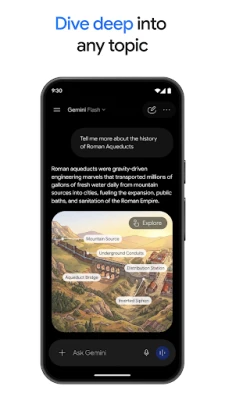
Gemini allows users to ask questions using natural language.
For example, someone learning web development could ask for an explanation of HTML elements, request a JavaScript example, or ask for help understanding an error message.
Users can also ask follow-up questions to explore a topic in greater detail.
The quality of an answer depends on the prompt, available context, and the model being used. AI-generated responses should not automatically be treated as verified facts.
2. Writing and Content Assistance
Gemini can help users develop written material for different purposes.
Examples include:
Drafting emails and professional messages.
Brainstorming blog post ideas.
Creating outlines for educational articles.
Rewriting text for clarity.
Developing social media content.
Summarizing lengthy written material.
A useful approach is to provide the intended audience, desired tone, and purpose of the content. Always review generated text for factual accuracy, originality, and appropriate wording before publishing.
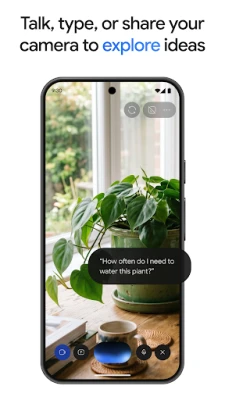
3. Gemini Live
Gemini Live provides a conversational experience that allows users to interact with the assistant using voice.
Depending on device and feature availability, users may also share camera or screen context to discuss what they are viewing.
Possible use cases include practising a language, discussing an idea, understanding something visible on screen, and brainstorming while working.
Live capabilities and availability can vary depending on the account, device, region, and current Google offering.
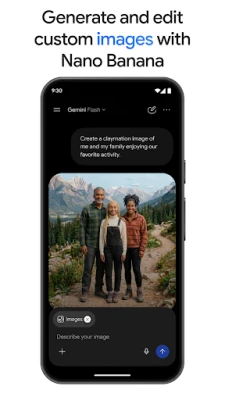
4. Image Understanding and Creative Tools
Gemini supports image-related interactions and creative features.
Users can provide supported images and ask questions about their contents. Depending on the available model and account access, creative tools may also support image generation and editing.
For example, a user might ask for an explanation of a chart, request design ideas, or develop a visual concept for a presentation.
Generated images should be reviewed before commercial or public use. Users should also respect copyright, privacy, and applicable content restrictions.
5. Document and File Analysis
The Gemini application supports uploading various types of content, including documents, spreadsheets, photos, and videos, subject to current file and account limitations.
This can be useful when someone wants to:
Summarize a lengthy document.
Understand information in a spreadsheet.
Extract key points from notes.
Ask questions about uploaded material.
Organize information for a project.
Always check important calculations, extracted information, and summaries against the original files.
Avoid uploading confidential business documents, sensitive personal information, or private records unless you understand the relevant privacy settings and data-handling terms.
6. Google App Integrations
Gemini can connect with selected Google services, subject to supported features and user permissions.
The Google Play listing mentions integrations with services such as Gmail, Google Calendar, Google Photos, YouTube, and Google Search.
These connections may help users work with information across their Google ecosystem.
Integration availability depends on account settings, region, supported services, and the permissions granted by the user.
7. Study and Learning Assistance
Students and independent learners can use Gemini to explore educational subjects and understand unfamiliar concepts.
Potential learning activities include:
Explaining difficult topics in simpler language.
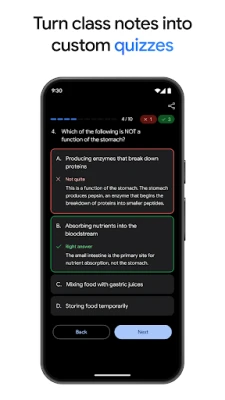
Creating practice questions.
Developing study plans.
Summarizing class notes.
Exploring examples and exercises.
Preparing for discussions and examinations.
Gemini can support learning, but it should not replace textbooks, qualified instructors, official study materials, or independent problem-solving.
8. Coding and Development Support
Developers and beginners can use Gemini to brainstorm programming solutions, understand code, explore technical concepts, and create prototypes.
For example, a beginner might request an explanation of a Python function or ask for help identifying an error in a small code sample.
Generated code should always be reviewed, tested, and checked for security issues before being used in production.
Practical Ways to Use Google Gemini
Here are some examples of how different users can incorporate the app into their daily activities.
For students: Ask for simplified explanations, practice questions, and structured study plans.
For content creators: Brainstorm video topics, create outlines, and develop alternative headline ideas.
For developers: Explore programming concepts, review sample code, and troubleshoot basic development questions.
For professionals: Organize meeting notes, draft messages, and summarize supported documents.
For everyday users: Ask general questions, explore new subjects, and get help planning routine activities.
These examples describe potential use cases rather than guaranteed results.
How to Get Better Results From Gemini
The quality of an AI response often depends on how clearly a request is written.
Be Specific
Instead of asking, "Explain SEO," provide more context, such as:
"Explain technical SEO for a beginner who manages a WordPress website."
Provide Relevant Context
Mention the intended audience, your objective, and any important restrictions.
Ask Follow-Up Questions
If the first answer is too broad, request a simpler explanation, additional examples, or a more detailed breakdown.
Verify Important Information
Use reliable external sources to check statistics, current policies, technical specifications, and other facts that may change.
Protect Sensitive Information
Avoid sharing passwords, financial credentials, confidential business information, or other sensitive material without understanding Google's applicable privacy and data-handling practices.
Google Gemini Free and Paid Plans
Gemini offers access to AI capabilities through different levels of availability.
Some features may be available without a paid subscription, while more advanced capabilities, higher usage limits, or additional tools may require an eligible Google AI subscription.
Plan names, pricing, model access, usage limits, and included features can change.
Check Google's official subscription information for the latest details rather than relying on outdated pricing or feature comparisons.
Limitations of Google Gemini
Although Gemini can be useful across many tasks, it has limitations that users should understand.
AI inaccuracies: Responses may include incorrect facts, outdated information, or fabricated references.
Usage limits: Certain models and features may have usage restrictions.
Regional availability: Some features may not be available in every country or account.
Internet and service dependency: Many features require an internet connection and access to Google's services.
Privacy considerations: Prompts, uploaded files, voice interactions, and other activity may be processed according to Google's applicable terms and privacy settings.
Human review: AI-generated content, code, and recommendations should be reviewed before being relied upon or published.
Privacy and Data Protection
Google provides a dedicated Gemini Apps Privacy Notice explaining how information is processed when people use Gemini.
Depending on the features used, information may include prompts, uploaded files, images, videos, voice interactions, device information, and location-related information.
Google also provides privacy controls and information about managing Gemini activity.
Before using the app, review the official privacy notice:
https://support.google.com/gemini/answer/13594961
For more information about Google's broader privacy practices, visit:
https://policies.google.com/privacy
Users should carefully consider what they share with any AI assistant.
Is Google Gemini Worth Exploring?
Google Gemini may be useful for people who want an AI assistant for writing, learning, research, brainstorming, file analysis, and creative tasks.
Its integration with selected Google services can also make it relevant to people who already use Google's ecosystem.
However, it is important to understand that AI-generated information is not always accurate, and access to advanced capabilities may depend on subscription and availability.
Whether the application is suitable depends on the user's needs, expectations, privacy preferences, and willingness to verify important results.
Our Editorial Assessment
Google Gemini is a broad AI assistant application that combines conversational assistance with productivity, learning, and creative capabilities.
Its strongest use cases include brainstorming, drafting, explaining concepts, exploring ideas, and working with supported files. The integration of voice and other interactive capabilities provides additional ways to use an AI assistant on a mobile device.
However, Gemini should be treated as an assistance tool rather than an unquestionable source of information. Users should independently verify important answers and understand the privacy implications of sharing information.
This guide is based on publicly available product documentation and Google Play listing information. It is not a hands-on performance benchmark or an independent security audit.
App Information
App Name: Google Gemini
Developer: Google LLC
Package Name: com.google.android.apps.bard
Platform: Android
Category: Productivity
Availability: Check Google Play for current availability and compatibility.
Official Download: Google Play Store.
Official Links and Resources
Product features, model access, pricing, and availability may change. Always consult Google's official resources for the latest information.
Disclaimer: ZenMedia is an independent app-discovery and informational website. It is not affiliated with, endorsed by, or officially connected to Google LLC. Google Gemini and related trademarks belong to their respective owner.