

Latest Version
1.66.7.1013673261
November 13, 2026
Google LLC
Tools
Android
55MB
50,000,000
Free
com.google.android.apps.labs.language.tailwind
Report a Problem
More About Gemini Notebook
Gemini Notebook: Features, Uses, and Complete Android App Guide
Gemini Notebook is an AI-powered research and learning application from Google LLC. It is designed to help users understand information from their selected sources, organize research materials, and explore topics through interactive AI assistance.
Unlike a general-purpose AI chatbot that primarily responds to open-ended prompts, a source-based notebook workflow focuses on information supplied by the user. This makes it particularly useful for people working with research documents, study materials, reference files, and collections of information.
In this guide, we explore the purpose of Gemini Notebook, its key capabilities, practical applications, limitations, and important privacy considerations.
What Is Gemini Notebook?
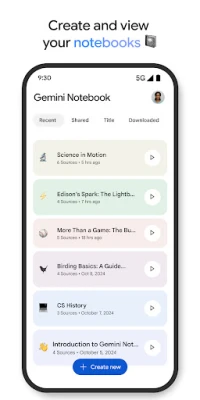
Gemini Notebook is a mobile research assistant designed to help users work with information from supported sources.
Users can organize materials into notebooks and interact with the available AI tools to understand the information they have collected.
For example, a student researching climate change might organize reports, articles, and study materials in one place. They can then use AI assistance to explore key ideas, identify important themes, and create summaries based on their sources.
The goal is to make research and information review more manageable without requiring users to read every document repeatedly.
Key Features of Gemini Notebook
1. AI-Powered Research Assistance
One of the main purposes of Gemini Notebook is to help users explore information through AI-assisted research.
Instead of repeatedly searching through long documents, users can ask questions about the materials they have added to a notebook.
Possible tasks include:
Understanding complex topics.
Identifying important information.
Finding connections between different sources.
Creating research summaries.
Exploring questions related to collected materials.
Source-based answers can make research more organized, but users should still verify important statements against the original documents.
2. Document and Source Organization
Research often involves information spread across multiple files and references.
A notebook-based workflow helps users bring relevant materials together for a particular subject or project.
For example, a content creator researching a new article could organize background documents, reference materials, and research notes in one notebook.
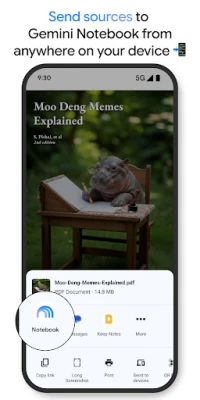
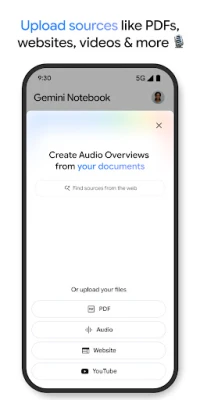
Supported source types and upload limits depend on the current application and account.
3. Document Summarization
Long documents can take considerable time to review.
AI-assisted summarization can help users identify major themes, important arguments, and key points from supported materials.
This may be useful for:
Academic reading.
Business reports.
Research documents.
Study notes.
Project references.
Educational resources.
However, summaries may omit important context or misunderstand technical details. Always compare important information with the original source.
4. Audio Overviews and Podcast-Style Learning
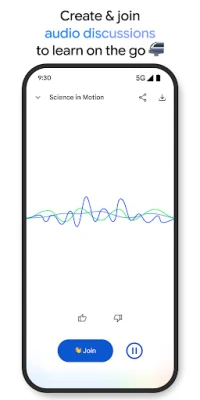
One of the interesting capabilities associated with Google's notebook research experience is Audio Overviews.
This feature can transform supported research material into a podcast-style audio discussion featuring AI-generated hosts.
It provides an alternative way to explore information for people who prefer listening rather than reading long documents.
Potential uses include:
Reviewing study material while commuting.
Listening to summaries of research topics.
Revisiting important concepts.
Exploring complicated subjects through conversational explanations.
Audio-generated content is not a substitute for the original sources. It may simplify information or leave out important details.
5. Interactive Questions and Answers
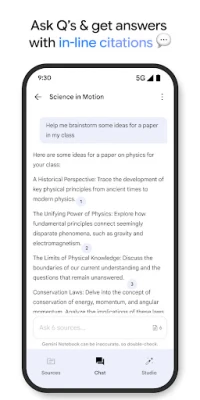
Users can interact with the AI assistant to explore information within their selected materials.
For example, someone studying a business report could ask:
What are the main findings?
Which important challenges are discussed?
What evidence supports the conclusion?
How do the different sections relate to each other?
The quality of answers depends on the quality, relevance, and completeness of the supplied sources.
6. Learning and Study Support
Gemini Notebook can support different learning activities.
Students may use it to organize reference material, explore complicated concepts, create revision summaries, and prepare questions for further study.
Independent learners can also use it to investigate unfamiliar subjects through a structured collection of resources.
For effective learning, compare AI explanations with textbooks, official documentation, and reliable educational sources.
7. Research Across Multiple Sources
Working with multiple documents can make it difficult to identify common themes.
A source-based AI notebook can help users explore relationships between different materials.
For example, a researcher comparing several reports might ask for a summary of shared findings or identify areas where the documents present different perspectives.
This is particularly useful during the early stages of research, when users are trying to understand a large amount of background information.
Practical Ways to Use Gemini Notebook
For Students
Students can organize course materials, review academic references, understand difficult topics, and create study summaries.
A useful approach is to create separate notebooks for different subjects instead of placing unrelated materials together.
For Researchers
Researchers can collect reference documents, explore connections, identify recurring themes, and prepare initial research summaries.
Important findings should always be checked against original publications.
For Content Creators
Bloggers and content creators can organize research material before writing an article.
They may use AI assistance to identify relevant themes, compare references, and prepare an initial content outline.
AI-generated information should never replace independent fact-checking or original editorial judgment.
For Professionals
Professionals can use notebook-based research workflows to review reports, organize project documents, and understand information relevant to their work.
Before uploading business documents, check the organization's privacy and data-handling requirements.
For Independent Learners
People exploring new subjects can collect educational resources and use AI assistance to understand unfamiliar terminology and concepts.
This can make self-directed learning more structured and easier to revisit.
How to Get Better Results
The usefulness of a research notebook depends heavily on the quality of its sources.
Step 1: Choose a specific topic. Create a notebook for one research subject or project.
Step 2: Collect reliable materials. Prefer original publications, official documentation, reputable educational resources, and credible research papers.
Step 3: Organize the sources. Use relevant documents and references rather than uploading unrelated information.
Step 4: Ask focused questions. Instead of asking broad questions, identify the exact information you need.
Step 5: Verify the answers. Compare important AI-generated statements with the original source material.
Step 6: Create your own notes. Record conclusions in your own words and preserve relevant references for future use.
Gemini Notebook vs General AI Chatbots
A research notebook and a general-purpose AI chatbot serve related but different purposes.
A general AI chatbot is often suitable for open-ended conversations, brainstorming, writing assistance, and broad questions.
A notebook-based research assistant is more focused on working with a selected collection of source materials.
For example:
Use a general AI chatbot when brainstorming ideas or exploring a broad subject.
Use a research notebook when organizing documents and investigating information from specific sources.
Use traditional search engines when discovering new websites, publications, and external references.
These tools can complement each other rather than replacing one another.
Limitations You Should Know
AI Responses May Be Inaccurate
Even when an answer is based on supplied sources, an AI system may misunderstand context, overlook important details, or produce an incorrect interpretation.
Source Quality Matters
Unreliable, incomplete, or outdated documents can lead to poor research results.
Upload and Usage Restrictions
File types, notebook limits, model access, and usage allowances may vary according to the application version and account.
Audio Summaries May Simplify Complex Subjects
Podcast-style discussions are useful for reviewing information, but they may not preserve every detail from the original material.
Internet Connectivity
Many AI-powered features require an internet connection and access to Google's services.
Privacy and Security Considerations
Before uploading documents, users should understand how their information may be processed.
Research materials can contain personal information, business records, unpublished work, or confidential documents.
Review Google's applicable privacy notices and account activity controls before sharing sensitive content.
Do not upload passwords, financial credentials, confidential client records, or other sensitive information unless you have confirmed that doing so is permitted and appropriate.
For additional information, consult:
Google Privacy Policy: https://policies.google.com/privacy
Google Account Privacy Controls: https://myaccount.google.com/data-and-privacy
Gemini Help Center: https://support.google.com/gemini/
Privacy practices and available controls may change.
Is Gemini Notebook Useful?
Gemini Notebook may be useful for people who regularly work with documents, educational materials, research references, and collections of information.
Its main appeal is the ability to combine organized source materials with AI-assisted explanations and audio-based learning experiences.
Students, researchers, content creators, and professionals may find this approach helpful when reviewing large amounts of information.
However, the tool should be considered a research aid rather than an independent authority. Users remain responsible for checking facts, evaluating sources, and drawing their own conclusions.
Our Editorial Assessment
Gemini Notebook offers a research-focused approach to AI assistance. Rather than relying entirely on open-ended conversations, its notebook workflow emphasizes organizing and exploring selected information.
The combination of source-based assistance, document exploration, and podcast-style audio discussions makes it an interesting option for people who prefer structured learning and research.
Its usefulness ultimately depends on the quality of the supplied materials and how carefully users review the generated results.
This editorial guide is based on publicly available product information. It is not a hands-on performance review, independent security audit, or guarantee of research accuracy.
App Information
App Name: Gemini Notebook
Developer: Google LLC
Package Name: com.google.android.apps.labs.language.tailwind
Platform: Android
Category: Productivity
Availability: Check the official Google Play listing for current device and regional availability.
Official Links and Resources
App features, supported sources, subscription options, and availability may change. Check Google's official resources for the latest information.
Disclaimer: ZenMedia is an independent app-discovery and informational website. It is not affiliated with, endorsed by, or officially connected to Google LLC. Google and Gemini are trademarks of their respective owner.