

Latest Version
5.0.0
October 19, 2026
WE R Developer
Tools
Android
44MB
5,000
Free
com.aura.tempmail
Report a Problem
More About Aura TEMPMAIL: Instant Email
Aura TEMPMAIL: Instant Email — Features, Uses, and Safety Guide
Aura TEMPMAIL: Instant Email is an Android application by WE R Developer that provides temporary email addresses. It is intended for situations where someone wants to receive messages through a short-term inbox rather than immediately sharing their primary email address.
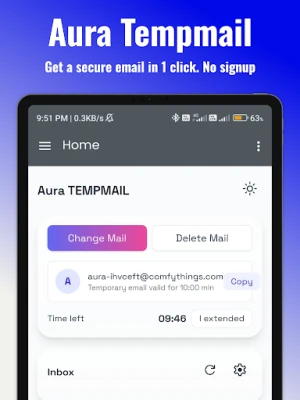
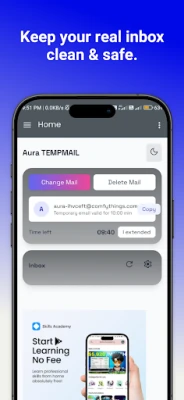
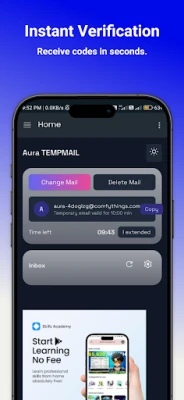
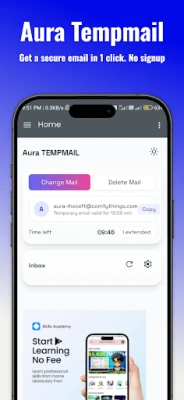
The app's Google Play listing describes features such as generating a temporary address, copying it, receiving messages and attachments, reading incoming email, and extending the inbox timer.
This guide explains how temporary email works, when it can be useful, its limitations, and what users should consider before using a disposable inbox.
What Is Aura TEMPMAIL?
Temporary email services provide an email address that can be used for limited or short-term purposes. Instead of using a primary inbox for every website registration or test, a user may choose a separate address when the service allows it.
Aura TEMPMAIL is listed on Google Play as an Android app for this type of use. Its exact availability and behaviour depend on the current app version and the service behind the temporary inbox.
A temporary email address should not be treated as a permanent or fully private email account. Anyone who can access the same temporary inbox may potentially see messages delivered to it, depending on how the service implements access and security.
Key Features Listed by the Developer
1. Instant Email Address Generation
The listing describes an option to generate a temporary email address without registering for a conventional email account.
This can be convenient when a website requires an email address for a low-risk, short-term interaction. Always check the website's rules before using a disposable address.
2. Copy an Address Quickly
The app listing describes one-tap copying. This may reduce manual typing when transferring the temporary address into a registration form.
Before submitting any form, verify that the copied address is correct and that you are comfortable receiving messages through a temporary inbox.
3. Receive and Read Incoming Emails
According to the listing, users can receive messages and read incoming email inside the app.
Message delivery depends on the sending service, the temporary email provider, and the website's acceptance of disposable addresses. Some services block temporary domains, and some messages may be delayed or never arrive.
4. Receive Attachments
The listing describes support for incoming email attachments.
Treat unexpected attachments with caution. Do not open files or follow links merely because they arrive in a temporary inbox. Verify the sender and the purpose of the message first.
5. Extend the Inbox Timer
The listing describes an option to extend the temporary inbox timer. The exact duration and availability should be checked in the current app.
Extending a timer does not turn a disposable address into a dependable permanent inbox. Messages and addresses may become unavailable according to the service's rules.
6. Dark Mode and Multiple Languages
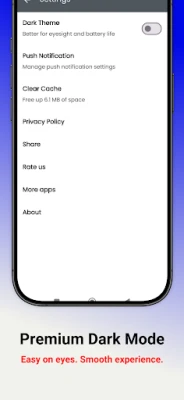
The listing also mentions a modern interface with dark mode and multi-language support. The available options may vary by version and device.
When Can a Temporary Email Address Be Useful?
Testing a Website or App
Developers, testers, and learners sometimes need an address to test a registration or email-delivery flow. A temporary inbox may help with non-production tests when using a disposable address is permitted.
For software development, dedicated test inboxes or controlled test accounts are usually more appropriate for repeatable testing.
Separating Low-Risk Sign-Ups
Some websites offer newsletters, downloads, or trial access in exchange for an email address. Where the website permits it, a temporary address may help keep routine messages separate from a primary inbox.
Review the website's terms and privacy notice before signing up.
Exploring an Unfamiliar Service
A separate address can reduce the need to share your main email immediately. However, it does not guarantee anonymity. Websites and service providers may use other information, such as IP addresses, device signals, cookies, or account activity, subject to their practices and applicable law.
How to Use a Temporary Email Service Carefully
Step 1: Identify the purpose. Use a disposable address only for a low-risk task that does not require long-term account access.
Step 2: Generate an address. Open the app and use its address-generation feature, following the current interface.
Step 3: Check the destination website's rules. Some platforms do not accept disposable email domains. Do not attempt to bypass verification, account restrictions, or anti-abuse systems.
Step 4: Wait for the message. Open the temporary inbox and check for the expected email. Delivery is not guaranteed.
Step 5: Verify the message. Confirm the sender and destination before opening links or attachments. Never enter sensitive credentials on a suspicious page.
Step 6: Finish the task. Do not assume that the address or its messages will remain available. If you need future account recovery, switch to a permanent email address where permitted.
Important Security and Privacy Limitations
Do Not Use It for Banking or Sensitive Accounts
Avoid using a disposable inbox for banking, payment services, government accounts, healthcare services, password managers, or any account where losing email access could cause serious harm.
A temporary address may expire or become inaccessible. If you lose access, you may be unable to recover the account.
Do Not Treat It as a Secure Personal Inbox
Temporary email is not automatically encrypted end-to-end, confidential, or anonymous. The actual privacy properties depend on the provider's implementation, access controls, infrastructure, and data practices.
Do not receive sensitive documents, private conversations, authentication secrets, or confidential business information through a disposable inbox.
Use OTPs and Verification Links With Care
The developer describes receiving verification codes and links as a possible use. However, a temporary address is not a suitable substitute for a trusted recovery method on important accounts.
Only use disposable addresses when the website allows them and when losing access to the inbox will not put your account or data at risk.
Review Privacy Disclosures
Google Play's Data safety section is supplied by the app developer and may change. The current listing indicates that the app may share certain data types with third parties and displays an encryption-in-transit disclosure. Users should open the current Data safety details and the developer's privacy policy before installation.
The listing's disclosures should not be interpreted as an independent security audit or a guarantee that all activity is anonymous.
Pricing and Advertisements
The Google Play listing indicates that Aura TEMPMAIL contains ads. Check the current listing and the app itself for any changes to pricing, features, or advertising practices.
This guide does not guarantee that every feature will always be available for free.
Who May Find Aura TEMPMAIL Useful?
The app may be worth exploring for:
People who need a temporary inbox for a low-risk sign-up.
Developers testing basic email workflows.
Users who want to separate certain routine registrations from their primary inbox.
Learners exploring how disposable email services work.
It may not be appropriate for anyone who needs reliable long-term email storage, secure confidential communication, or dependable account recovery.
Our Editorial Assessment
Aura TEMPMAIL is positioned as a temporary email utility for short-term inbox access. The listed features focus on address generation, message viewing, attachment support, and control over the inbox timer.
Its usefulness depends on the reliability of message delivery, the service's access controls, and the user's intended purpose. Temporary email can be convenient for low-risk tasks, but it should not be confused with a permanent private mailbox.
This guide is based on publicly available app-listing information. We have not independently tested the app, audited its security, or verified every feature in the current version. This is an informational guide rather than a hands-on security review.
Official Listing and Further Reading
View the app: Aura TEMPMAIL: Instant Email on Google Play
Understand app disclosures: Google Play Data safety information
Improve account security: Use unique passwords and trusted recovery methods for important accounts.
App features, privacy disclosures, and availability may change. Check the current Google Play listing and the developer's privacy policy before installing or relying on the app.