

Latest Version
8.0.0
October 19, 2026
WE R Developer
Tools
Android
43
10,000
Free
com.ai.seotools
Report a Problem
More About AI Youtube SEO Tools
AI YouTube SEO Tools: Features, Uses, and Practical Guide
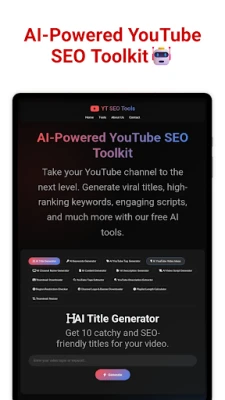
AI YouTube SEO Tools is an Android application listed on Google Play by WE R Developer. It is designed for creators who want help with common video optimization tasks, including keyword ideas, video tags, title suggestions, and thumbnail resizing.
Instead of switching between separate utilities for every small task, creators can explore several content-planning features through one application. The usefulness of its recommendations will depend on the quality of the suggestions and how well they fit a particular video and audience.
What Can You Do With AI YouTube SEO Tools?
1. Generate YouTube Tag Ideas
The app listing describes a tag-generation feature that suggests tags for videos.
Tags may help describe a video's subject, alternate spellings, or related terminology. However, creators should not expect tags alone to produce higher rankings. YouTube explains that a video's title, thumbnail, and description are generally more important for discovery, while tags can be useful in specific cases such as common misspellings.
Practical tip: Start with the exact subject of your video. Review every suggested tag and remove terms that do not accurately describe the content.
2. Explore Keyword Suggestions
Keyword suggestions can help creators brainstorm phrases that viewers might use when searching for a topic.
For example, a creator preparing a beginner tutorial about video editing could compare phrases such as “video editing for beginners,” “how to edit videos on Android,” and “easy mobile video editing tutorial.”
These are brainstorming examples, not verified search-volume measurements. Before choosing a target phrase, compare its relevance with your actual video and use reliable research sources when search demand matters.
3. Improve Video Title Ideas
The listing describes a video title optimization feature intended to help creators develop search-friendly titles.
A useful title should explain what the viewer will learn or see. It should be specific, readable, and consistent with the video itself.
For example:
Vague: “Amazing Editing Trick”
More specific: “How to Add Smooth Transitions in a Mobile Video Editor”
The second title communicates the topic more clearly. Neither wording guarantees views or rankings, and the best title depends on the video and its audience.
4. Resize Thumbnails
The app listing also mentions thumbnail resizing and enhancement.
A thumbnail should remain readable at small sizes, use clear visual hierarchy, and accurately represent the video. Resizing can help with dimensions, but it cannot automatically make an unclear design compelling.
Before publishing, check the current thumbnail specifications in YouTube's official documentation and preview the image on a small screen.
5. Plan Content More Efficiently
Creators can use keyword and title ideas as starting points for planning tutorials, reviews, educational videos, and other formats.
AI-generated suggestions should be reviewed before use. Remove unsupported claims, avoid misleading titles, and make sure the final video delivers what its title and thumbnail promise.
How to Use the App in a YouTube Workflow
The following is a practical workflow for using the types of features described in the app listing. Exact menu names and steps may differ in the current app version.
Step 1: Define your video topic. Write one sentence explaining the subject and intended audience.
Step 2: Explore keyword ideas. Use the available keyword feature to brainstorm relevant phrases. Treat the results as suggestions, not verified analytics.
Step 3: Review tag suggestions. Keep only terms that genuinely describe the video. Avoid unrelated tags and repetitive keyword lists.
Step 4: Draft a clear title. Compare suggested titles with your own version. Choose the wording that best communicates the video's actual value.
Step 5: Check the thumbnail. If you use the resizing feature, inspect the final image for readability and correct dimensions.
Step 6: Verify before publishing. Review the video, description, thumbnail, and title together. Make sure the metadata is accurate and the content meets YouTube's current policies.
Who May Find This App Useful?
This app may be worth exploring for:
New YouTube creators learning about video metadata.
Small creators who want a convenient place to brainstorm title and tag ideas.
Mobile-first creators who need help preparing thumbnails.
Experienced creators who want to compare suggestions with their own research.
The app should be treated as a supporting utility rather than a replacement for audience research, original content, or official YouTube analytics.
Important Limitations
AI-generated keyword ideas do not automatically represent actual search volume, competition, or ranking potential. Suggestions may be broad, repetitive, or unsuitable for a specific audience.
No title, tag, or keyword tool can guarantee a particular number of views, subscribers, or search rankings. Results depend on many factors, including the video itself, audience interest, competition, viewer satisfaction, and YouTube's systems.
The features described here are based on the app's public Google Play listing. We have not independently verified every feature, its current performance, or its results across devices.
Pricing and Availability
The Google Play listing identifies the app as containing ads. Check the current store listing for the latest availability, compatibility, in-app disclosures, and any changes to its pricing or features.
The developer's listing and privacy disclosures should be reviewed before installation. Google Play's Data safety section currently indicates that the developer reports certain data collection and sharing practices; users should consult the current listing for the complete and latest details.
Privacy and Permissions
Before installing any application, review the permissions it requests and consider whether they make sense for its features. Check the developer's privacy policy and the app's Data safety information to understand the stated data practices.
Do not provide sensitive account credentials or grant permissions without understanding why they are requested. Privacy and security cannot be determined solely from an app's name or feature list.
Our Editorial Assessment
AI YouTube SEO Tools brings together several types of utilities that can support a creator's planning workflow. Its potential value is convenience: users can explore keyword ideas, tag suggestions, title assistance, and thumbnail resizing in one Android app.
Its practical value will depend on the relevance and quality of its outputs. Creators should independently check keyword demand, edit suggested titles, and use YouTube's official resources to guide their decisions.
This is an informational assessment based on the publicly available listing, not a hands-on performance review. We have not independently tested the application or confirmed that its recommendations improve channel performance.
Official Source and Further Reading
Get the app: AI YouTube SEO Tools on Google Play
YouTube Help: Add tags to your YouTube videos
YouTube Help: Video tips for thumbnails
App details, features, and data disclosures may change. Check the developer's current Google Play listing before making an installation decision.