

Latest Version
19.0.0
October 19, 2026
WE R Developer
Education
Android
69MB
5,000
Free
com.skills.academy
Report a Problem
More About Skills Academy: Video Courses
Skills Academy: Video Courses — Features and Learning Guide
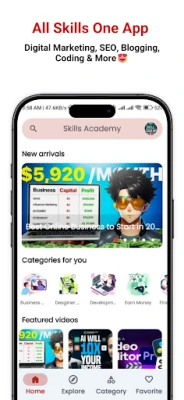
Skills Academy: Video Courses is an Android application by WE R Developer that helps users discover video-based learning resources across a range of digital and professional skill topics.
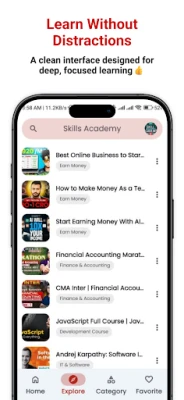
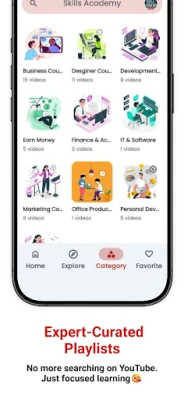
According to its Google Play listing, the app brings together curated video courses from YouTube creators. Its subject areas include digital marketing, web development, graphic design, video editing, IT, business, and online publishing.
This guide explains the app's stated purpose, who may find it useful, how to approach video-based learning, and what to check before installing it.
What Is Skills Academy: Video Courses?
Skills Academy is designed for people who want to explore educational videos without having to search for every topic separately.
Its listed subject areas may appeal to beginners exploring digital skills, creators learning new workflows, and independent learners looking for tutorials in areas such as SEO, web development, or graphic design.
The app should be understood as a way to discover learning content. The availability of a topic does not necessarily mean that every course is professionally accredited, independently assessed, or suitable for every learner.
Key Learning Areas
1. Digital Marketing and SEO
The listing describes learning resources related to search engine optimization, social media marketing, content marketing, and online advertising.
Beginners can use relevant tutorials to understand basic terminology and explore common marketing workflows. Since digital platforms change frequently, check the publication date of each video and compare important advice with current official documentation.
2. Web and App Development
The app lists development-related learning among its subject areas.
Video tutorials can help learners follow coding examples and become familiar with development concepts. However, watching a tutorial alone is rarely enough to build practical skills. Try the examples yourself, read the relevant documentation, and build small projects to test what you have learned.
3. Graphic Design and Video Editing
The listing also mentions creative subjects such as graphic design, UI/UX, and video editing.
These subjects can benefit from visual demonstrations. Learners should practise the demonstrated techniques in their own projects and check whether a tutorial uses software versions that match their devices.
4. Business and Online Publishing
The app's listed topics include business and online earning-related education.
Treat financial and business advice as educational information rather than a promise of income. Results depend on individual circumstances, skills, market demand, and execution. No course can guarantee earnings, employment, or business success.
5. English and Hindi Learning Resources
The Google Play description states that the app offers learning resources in English and Hindi.
Language availability may differ by course. Check an individual video's language and accessibility before committing time to a learning path.
How to Get More Value From Video Courses
Use this simple process to turn educational videos into practical skills.
Step 1: Set a learning goal. Choose one skill and define a specific outcome, such as creating a basic website page or editing a short video.
Step 2: Choose a relevant tutorial. Review its title, subject, language, creator, and publication date. Prefer resources that clearly explain the intended learning level.
Step 3: Practise while watching. Pause the video and reproduce the demonstrated steps. For coding or design topics, create a small project rather than only taking notes.
Step 4: Verify important details. Software interfaces, platform policies, and technical recommendations can become outdated. Consult official documentation whenever accuracy matters.
Step 5: Review your progress. Record what you learned, what you can do independently, and which concepts still need practice.
Step 6: Check usage rights. If a tutorial includes code, images, templates, or other downloadable assets, review the creator's licence before reusing them in commercial projects.
Who May Find This App Useful?
Skills Academy may be worth exploring for:
Beginners who want to discover digital learning topics.
Self-learners who prefer video-based explanations.
Content creators exploring design, editing, or SEO tutorials.
People comparing learning resources before choosing a structured course.
It may be less suitable for learners who specifically need accredited qualifications, verified certificates, instructor feedback, formal assessments, or guaranteed career placement. Those requirements should be checked with the relevant course provider.
What to Check Before Installing
Course quality and accuracy
A curated collection can make resources easier to discover, but curation alone does not establish the accuracy or quality of every video. Evaluate the individual creator and cross-check important information.
Course availability
Because the listing describes content sourced from YouTube creators, course availability may depend on the original video's continued availability and the app's integration. A video may change, become unavailable, or no longer match a learner's needs.
Pricing and advertisements
The Google Play listing indicates that the app contains ads. Although its description promotes free learning, users should review the current store listing and in-app disclosures for the latest information about costs and advertising.
Privacy and permissions
Review the app's current Google Play Data safety section and privacy policy before installation. Google Play currently displays a disclosure that location data may be shared with third parties. Data safety information is supplied by the developer and may change, so check the current details rather than assuming the app collects no information.
Only grant permissions that you understand and consider appropriate for the app's functionality.
Limitations to Keep in Mind
The availability and quality of courses may vary by topic and creator.
Video tutorials may become outdated as software and online platforms change.
Watching courses does not automatically establish professional competence.
A course listing does not guarantee a certificate, employment, income, or a particular result.
The app's actual performance and every listed feature have not been independently tested for this editorial guide.
Our Editorial Assessment
Skills Academy: Video Courses is positioned as a discovery option for people interested in video-based learning across digital and creative subjects. Its central appeal is the ability to explore multiple learning topics through one Android application.
Its practical usefulness depends on the relevance of the available videos, their accuracy, and the learner's willingness to practise. Before choosing a course, review the individual creator's work and confirm that the content matches your current goals.
This assessment is based on publicly available listing information. It is not a hands-on review, a certification assessment, or an endorsement of every course featured in the app.
Official Listing and Further Reading
View the app: Skills Academy: Video Courses on Google Play
Learn more about YouTube: YouTube Help Center
Check software documentation: Use the official documentation for the specific programming language, design application, or platform you are studying.
App details, course availability, privacy disclosures, and features may change. Check the current Google Play listing before installing the app.