
Latest Version
1.613.1
November 13, 2026
Google Labs
Tools
Android
42MB
10,000,000
Free
com.google.android.apps.labs.whisk
Report a Problem
More About Google Flow
Google Flow: AI Image and Video Generator — Features and Complete Guide
Google Flow is an AI-powered creative application developed by Google Labs. It helps users turn visual ideas into images and videos using generative AI technology.
The application is designed for creators who want to explore visual concepts, develop creative projects, and refine generated media through an AI-assisted workflow.
Google Flow is also connected to the earlier Google Whisk experiment. While Whisk focused on image-based prompting and visual remixing, Google has moved its creative capabilities into the broader Flow platform.
This guide explains Google Flow's features, practical uses, creative workflow, limitations, and important considerations before installing the Android application.
What Is Google Flow?
Google Flow is a creative workspace for AI-assisted image and video generation.
It is designed to help users move from an initial idea to a visual result through generative AI tools. Instead of relying entirely on traditional editing software, users can explore creative directions and refine their work using supported AI features.
The application is particularly relevant to digital artists, content creators, designers, filmmakers, and people interested in experimenting with generative media.
Google Flow is not simply a conventional photo editor. Its primary purpose is to support AI-powered creative workflows.
From Google Whisk to Google Flow
Google introduced Whisk in December 2024 as an experimental image-generation tool.
One of its distinctive ideas was image-based prompting. Users could provide separate images representing a subject, a scene, and a visual style rather than writing a long text prompt.
Whisk used Gemini to interpret the submitted images and Google's Imagen image-generation technology to create visual variations.
In March 2026, Google announced that Whisk's capabilities would move into Flow. Whisk was scheduled for discontinuation on April 30, 2026.
Google Flow is therefore the current product to explore through the supplied Android listing.
This distinction is important because older articles and tutorials may still refer to Whisk, while the current application uses the Google Flow name.
Key Features of Google Flow
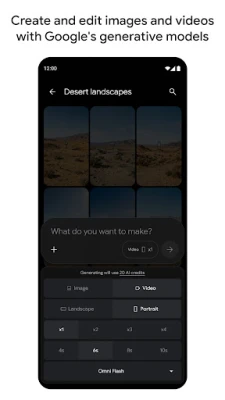
1. AI Image Creation
Google Flow provides AI-powered image creation capabilities.
Users can explore visual concepts and generate images based on their creative requirements and supported workflows.
Possible creative applications include:
Concept artwork.
Visual storytelling.
Character concepts.
Creative illustrations.
Marketing visual ideas.
Design inspiration.
Social media graphics.
Generated results depend on the selected model, prompt, available credits, and applicable content restrictions.
2. AI Video Generation
Flow also supports AI-assisted video creation.
This allows creators to explore motion-based visual ideas rather than limiting their projects to static images.
Potential use cases include:
Short creative video concepts.
Visual storytelling experiments.
Scene development.
Promotional video ideas.
Creative animation concepts.
Video generation may require more credits and processing time than image creation. Availability and generation limits depend on the current account and plan.
3. Image Refinement
Creative projects often require several rounds of adjustments.
Google Flow provides workflows for refining generated visual content and developing ideas further.
Rather than accepting the first result, creators can explore different visual directions and make changes according to their objectives.
The exact editing controls and supported operations may vary between models and application versions.
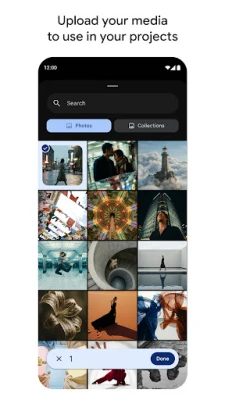
4. Camera Roll and Live Camera Uploads
The current Android application describes direct camera-roll and live-camera uploads.
These options allow users to bring personal visual references into supported creative workflows.
For example, a creator may use an existing photograph as a starting point for a visual project.
Always consider image ownership, privacy, and consent before uploading photographs of other people or commercially licensed material.
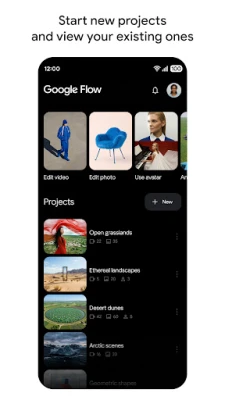
5. Unified Creative Library
Google Flow provides a project and asset library that can stay synchronized with its desktop experience.
This can help users access their creative work across supported devices.
A unified workspace is useful for creators who start an idea on a phone and continue developing it on another device.
Synchronization and access depend on the Google account, supported features, and connectivity.
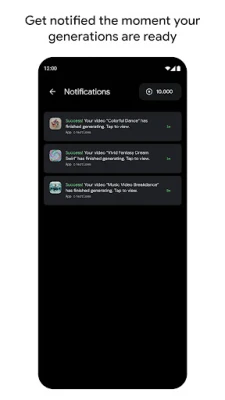
6. Background Generation and Notifications
The Android listing describes the ability to run multiple image and video generations in the background.
Users can receive notifications when generated media is ready.
This can make longer creative workflows more convenient because users do not necessarily need to remain on the generation screen while processing continues.
Notification permissions and background activity may depend on device settings.
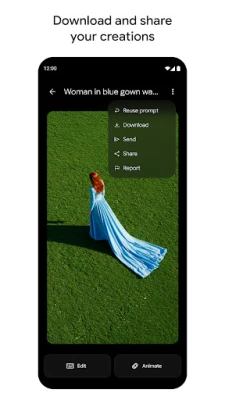
7. Download and Share Creations
After completing a creative project, users can download and share their generated media.
This makes it easier to move finished work into other creative applications or prepare it for sharing.
Before publishing AI-generated content, review its accuracy, quality, originality, and suitability for the intended audience.
What Happened to Google Whisk?
Google Whisk was introduced as a Google Labs experiment focused on visual prompting.
Its main workflow allowed users to combine subject, scene, and style references to explore different creative outcomes.
Google later announced that Whisk would be discontinued on April 30, 2026, with its capabilities moving into Flow.
Users were advised to save their Whisk libraries and follow the available migration instructions before the discontinuation date.
This matters for anyone searching for older Whisk tutorials or looking for the original application.
For current creative workflows, the Google Flow listing is the relevant destination.
Practical Ways to Use Google Flow
For Social Media Creators
Creators can explore visual concepts for posts, campaigns, and creative storytelling.
AI-generated visuals may help with early-stage brainstorming, although finished content should be reviewed before publishing.
For Graphic Designers
Designers can use generative tools to explore different compositions, visual directions, and creative concepts.
The application may be useful during the idea-development stage of a project.
For Video Creators
Video generation tools can help creators experiment with visual sequences and storytelling concepts.
Generated footage may still require additional editing and quality control before being used in a finished production.
For Digital Artists
Artists can experiment with different visual ideas, explore styles, and develop creative references.
AI-generated results should be treated as creative starting points rather than replacements for individual artistic judgment.
For Marketing Teams
Marketing professionals can explore campaign visuals and develop initial creative directions.
Before using generated material commercially, review relevant rights, brand requirements, and platform policies.
How to Get Better Creative Results
Step 1: Start with a clear concept. Decide what you want to create, whether it is an illustration, visual scene, or short video.
Step 2: Prepare suitable references. Use images that you own or have permission to use.
Step 3: Explore available creative tools. Review the image and video generation options available to your account.
Step 4: Experiment with variations. Compare different creative approaches rather than relying on the first generated result.
Step 5: Refine your selection. Make appropriate changes using the available editing and generation controls.
Step 6: Review the final output. Check visual consistency, unwanted elements, and suitability before downloading or sharing.
Google Flow Credits and Pricing
AI image and video generation can involve usage-based credits.
The amount of credit required may depend on the selected model, generation type, output settings, and current Google offering.
Some capabilities may be available without a paid subscription, while other features or higher usage limits may require an eligible plan.
Pricing, credit allowances, and model access can change. Check Google's official Flow information and the current application for accurate details.
Important Limitations
AI Results Are Not Always Predictable
Generated images and videos may differ from the intended concept. Objects, faces, backgrounds, and other visual details can sometimes be inconsistent.
Content Restrictions
AI generation systems use safety restrictions. Some requests or uploaded references may be blocked even when users expect them to be acceptable.
Credit Consumption
Repeated generations and refinements may consume available credits. Review usage information before starting larger projects.
Regional Availability
Features, models, subscriptions, and access may vary across countries.
Internet Connection
Generative AI workflows generally require an active internet connection and access to Google's services.
Copyright and Usage Rights
Users should review the relevant terms and policies before using generated or uploaded content commercially.
Do not assume that every uploaded image or generated result is automatically free of copyright or licensing restrictions.
Privacy and Security Considerations
Google Flow may process uploaded images, videos, account information, and creative project data to provide its services.
Before uploading personal photographs or confidential business material, review Google's applicable privacy policies and the permissions requested by the application.
Avoid uploading sensitive personal documents, private photographs, confidential client material, or content that you do not have permission to use.
For more information, consult Google's official privacy resources:
Who Should Consider Google Flow?
Google Flow may be worth exploring for:
Digital artists interested in generative AI.
Social media content creators.
Video creators experimenting with AI workflows.
Designers exploring visual concepts.
Marketing professionals developing creative ideas.
People interested in AI-generated images and videos.
It may be less suitable for users who need precise professional editing controls, guaranteed visual consistency, or unrestricted generation.
Our Editorial Assessment
Google Flow represents Google's broader approach to AI-powered visual creation.
Its combination of image generation, video workflows, creative refinement, project synchronization, and mobile access makes it relevant to creators who want to experiment with generative media.
Its evolution from Whisk into Flow is also important for users following Google's creative AI products.
However, generated results are not guaranteed to match every creative requirement. Users should consider available credits, regional access, content restrictions, and usage rights before relying on the platform for professional projects.
This guide is based on publicly available Google product announcements and the current Android listing. It is not a hands-on performance benchmark or an independent security audit.
App Information
App Name: Google Flow
Former Product: Google Whisk
Developer: Google Labs
Package Name: com.google.android.apps.labs.whisk
Platform: Android
Category: Art & Design
Main Purpose: AI-powered image and video creation
Availability: Check Google Play for current device and regional availability.
Official Links and Resources
Features, pricing, available models, and supported countries may change. Always check Google's official resources for the latest information.
Disclaimer: ZenMedia is an independent app-discovery and informational website. It is not affiliated with, endorsed by, or officially connected to Google LLC or Google Labs. Google, Whisk, and Flow are trademarks of their respective owner.